
Δωρεάν συνεδρίες

Online Call for Management & Core Team
📞 Free Discovery Call
This 30-minute discovery call is entirely free and with no strings attached. It’s your chance to share your current challenges and pain points so we can explore why implementing Asana will be valuable for you, what you expect from it, and how you will benefit by working with us.
30mins | 5 participants max.
Online Call for Management & Core Team
📞 Free Asana Quick Audit
This 30-minute session is entirely free and with no strings attached. You’ll give us a quick tour of your current Asana setup so we can run a light audit. By showing us what’s working and what’s not, we’ll review your hierarchy, structure, use of features, and other factors that make up a healthy Asana space.
30mins | 3 participants max.


Online Call for Management & Core Team
📞 Free Asana Demo
This 30-minute session is entirely free and with no strings attached. We’ll walk you through the features of the Asana tier you’re interested in purchasing, discuss your requirements, and review what you’d like Asana to replace from your current platform. From there, we’ll help you decide which tier will deliver the most value for your team.
If you’re considering an Asana annual plan, we can also set you up with a free trial and, as your Asana account managers, potentially offer you a discount on your first annual subscription. The discount depends on the tier you select and the number of licences your team requires.
30mins | 3 participants max.


Online Call for Management & Core Team
📶 Free consultation on the right Asana plan and number of seats
If you’re not sure which Asana plan is right for you, we offer a free 30-minute call to review your requirements, budget, and number of seats. We can then set you up with a free trial and, as your Asana account managers, offer up to a 10% discount on your first annual subscription.
30mins | 5 participants max.

Consulting

Online Call for Management & Core Team
🔍 Asana Deep Audit
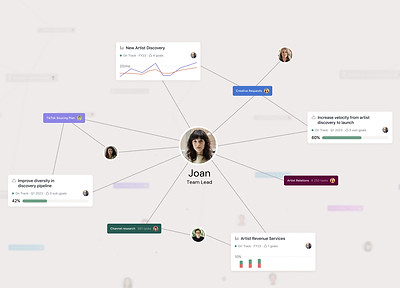
Either as a one-off session or a series of sessions (depending on the size of your Asana space), you or your core team will give us a tour of your current setup for us to audit. Together, we’ll deep dive into the structure and processes you already have in place, while you share what’s working well and what isn’t.
90mins | 5 participants max.
Online Call for Management, Core Team & Champions
🔮 Advanced Features Demo
These sessions are designed to introduce your champions to all the advanced features in Asana. These will inspire the champions for what they can achieve with Asana, so that during the workshops, they will be in a better position to make suggestions and proposals for designing their workflows and processes.

3h (2x 1h30) | 10 participants max.
Training

Online Training for Management, Core Team & Champions
🔮 Asana Features Overview
These sessions are designed to introduce you and your champions to Asana's essential features in order to inspire them and start thinking of what they can achieve with Asana. These sessions will set the foundations whilst introducing the building blocks which they will have at their disposal for creating projects and processes in Asana.
For beginners or advanced
3h (2x 90mins) | 10 participants max.


Online Training for all members & Champions
🎓 Basic Training
A fun and engaging training session with hands-on exercises, split into two 90-minute parts. It’s ideal for teams just starting out with Asana who need to get up to speed quickly. The training focuses on Asana’s fundamentals and hierarchy, best practices, and how to communicate and track work effectively.
For beginners
3h (2x 1h30) | 20 participants max.


Online Training for Champions
🎓 Champions Training
Every successful onboarding requires a select group of members we call Champions. This training session is designed to inspire them and ensure they gain all-round knowledge of Asana’s features and best practices, so they can support others and drive adoption across your company.
For beginners or advanced
3h (2x 90mins) | 10 participants max.
Online Training for Management, Core Team & Champions
🎓 Asana Admins Training
A special training session designed exclusively for your Asana admins on how to make the most of the Admin Console. This one-off session provides a complete tour of all settings and covers the differences between Members and Guests, along with how to correctly add, remove, or deprovision them.
For beginners or advanced
60mins | 5 participants max.


Online Training for all members & Champions
🎓 Advanced Training
This three-part training series, 90 minutes each, is designed for existing Asana users who want to take their skills to the next level and harness the power of Asana’s advanced features, particularly those available on the Business and Enterprise tiers.
Advanced training focuses on a deeper understanding of permission levels and privacy settings for Teams and Projects, managing notifications effectively, and working with Custom Fields for advanced sorting, filtering, saved view tabs, and Dashboards.
The training also covers setting up and managing cross-functional projects, creating scalable systems using Rules and multihoming, reviewing documents and images with Asana’s Proofing tool, and converting tasks into Approvals, Milestones, Subtasks, Task Templates, or Projects. We also explore how to use advanced Rules to automatically create tasks and subtasks.
You will also learn how to save time by launching projects faster using Project Templates with dynamic dates and project roles, setting up dependencies with the Gantt view, and building Rules and Task Templates directly into them.
You can also tailor these sessions by choosing your own topics to explore, such as using Status Updates and Portfolios, managing your team’s capacity with the Workload feature, syncing tasks to calendars, importing CSVs to create projects or custom fields, building intake forms, creating company knowledge bases (LMS or KMS), keeping your Asana space organised by archiving old projects, working with external clients or vendors, and sharing projects, deliverables, Timelines, or Gantt charts.
Anything you can think of, we can help you and your team step up your game.
For beginners or advanced
4.5h (3x 1h30) | 20 participants max.


Online Training for Management & Champions
💼 Management Training
Specifically designed for Team Leaders, Executives and Management level, this one-off session will empower you with all the features you need for tracking and reporting on your team or company's work, and providing you with visual dynamic dashboards so you can get the overall picture in one place.

The session will cover Asana's features such as the project Overview and Dashboard tabs, setting up Portfolios and their Dashboards, posting or requesting Status Updates on projects, making use of the Workload feature for reviewing capacity, Universal Reporting and using the Goals feature to set up your company's OKRs and KPIs.

For beginners or advanced
90mins | 10 participants max.

Online Training for all members & Champions
🎓 System Training
These sessions are designed for everyone who will be using the projects and workflows we’ve migrated into Asana. The training focuses on using the system itself - skipping the ins and outs of every Asana feature - and instead concentrating on best practices for working effectively in your new setup.
For beginners or advanced
3h - 6h | 20 participants max.
We’ll also cover Asana’s fundamentals and hierarchy, hands-on setup of profiles and notification settings, best practices for using Inbox and My Tasks, how to create a well-structured task, and how to communicate, track, and collaborate in Asana.
Online Training for all members & Champions
👥 1:1 Training
Whether you’re new to Asana and need a crash course to get up and running quickly, or you’ve been using it for a while but haven’t yet unlocked its full potential - or even if you just want to brush up on your skills - this session can be tailored specifically for you.
Delivered as a one-off or a series of 30-, 60-, or 90-minute sessions, we’ll answer your questions and leave you with brand new Asana skills to take your work to the next level.
For beginners or advanced
30, 60 or 90mins | 1 participant max.
Online Training for all members & Champions
🙋 Follow up / Q&A
This session typically occurs a few weeks after the roll out of Asana and is open to champions or all members to bring any questions, as well as, focusing on best practices for your workflows.
For beginners & advanced
90mins | 20 participants max.

Workshops
Online Workshop for Management & Core Team
📥 Getting your work into Asana
This specially themed session showcases the best ways to move your existing work quickly into Asana so you can get up and running fast.
We’ll guide you through using Asana’s CSV importer to bring in work from spreadsheets or other platforms, building intake forms for different types of requests, setting up task templates to reduce repetitive work, and converting emails into tasks.


For beginners or advanced
90mins | 15 participants max.


Online Workshop for Core Team & Champions
🚀 Workflow Design Workshops
Usually delivered as part of a series, these 30-, 60-, or 90-minute workshops guide you in building your own projects, processes, and workflows in Asana, while showing you how to make the best use of its features.
For beginners or advanced
30, 60 or 90mins | 5 participants max.


Online Workshop for Core Team & Champions
🚀 System Design Workshops
These workshops are part of the System Design package and give you the opportunity to brief us on what you need built in Asana, tailored to your requirements and specifications. We then create a prototype for your team to review, trial, and test before full deployment.

For beginners or advanced
30, 60 or 90mins | 5 participants max.
Support
Support Service

Don’t know where to start? Spending too much time searching for answers in the Asana Forum or Guide? No time to set up your Asana - and can’t risk getting it wrong? Leave it to the experts.
With this package, we do the heavy lifting by designing and building your processes and workflows in Asana. By skipping training and tutorials, your champions or core team members can stay focused on their work, saving you both time and budget.
This approach guarantees a fully functional Asana system tailored to your needs. There are no blueprints and no templates — everything is built to order for your organisation.
Through a series of System Design Workshops, we build prototypes for review and testing with a small group before rolling them out across the company. This process is paired with System Training sessions to ensure everyone is confident using the system we design and build for you in Asana.

Support Service
🔽 Importing a CSV into Asana
Got a spreadsheet or set of data in another platform and you need to get it into Asana? You tried doing it yourself using Asana's CSV importer but you are running into problems?
The options, of the dropdown fields that you imported, are not sorted alphabetically or as per your spreadsheet and are being created with random colours but you just want them all grey?
Some columns of your spreadsheet are not importing in the same number format, percentage or currency?
You already have a dropdown custom field in your library that you want to match to a column of the spreadsheet you are importing, but for some reason, you get errors and it won't work?


We can import your existing projects or spreadsheets from other platforms into Asana as new projects - fully set up and ready to go.

Importing a spreadsheet into Asana is a one-off action and a big moment — let us do it for you. With our expertise, we’ll advise on the best field type for each column and ensure your data is mapped correctly to the custom fields already in your library.
Support Service
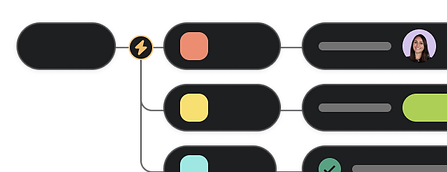
⚡ Rules & Automations Setup
Finding Asana’s Rules feature overwhelming? Or maybe you know how to use them but don’t have the time to build everything and keep your system running smoothly? With this package, we take care of the heavy lifting for you.

Support Service
📝 Form Builder
Asana’s built-in Forms feature is one of our favourites, and we love building with it. If it’s not yours - or if you’re running into trouble - we can build your forms for you.
Whether your existing forms are in PDFs, Word docs, or apps like Wufoo or Google Forms, we can recreate them directly in your Asana space.

Support Service
🔌 3rd-Party Integration Setup
Take your automations beyond Asana’s native Rules by connecting Asana to other apps in your tech stack, automatically syncing tasks and data between them.
We can set up third-party tools like Flowsana, Zapier, or Make for you - or show you how to configure them yourself - to create powerful rules and workflows that go far beyond what’s possible with Asana alone.


🪲
🚀
Support Service
🤩 Add emojis throughout your Asana space
Is your Asana space looking a bit bland? How about a sprinkle of emojis.. everywhere?
Emojis aren't just fun and for social apps; they can be used as an incredibly effective visual cue for yourself and your members to navigate Asana with ease.
Easily find Teams and Projects in your sidebar, as well as tasks types, section names, custom field values and even charts in dashboards.
So give your Asana space the look you want while also making it more appealing and engaging for your members!
Hover over the below demo to see the differences with or without emojis. Can you spot them all?


Before
Without emojis
After
Emojis added to Team name, Project name, Section title, Task titles and Custom Fields values, optionally without the use of colour
🌐
Support Service
📊 Setup Dashboards in Projects, Portfolios & Reporting
Get the insights you need into your work in Asana. If you’re struggling to surface data and statistics with Dashboards, we can set them up for you - whether for individual Projects, Portfolios, or a full overview of your entire Asana space using Universal Reporting.


Support Service
▶️ Consolidate duplicate fields
You may have several custom fields that look similar but appear as duplicates in a task’s details - for example Priority, Status, Effort, or Cost.
So when you update the Priority in one project, it doesn’t update the same value in the other projects that the task is multi-homed to, right?
We can help you clean up duplicate fields and consolidate similar ones within your organisation’s field library, so your team always knows which fields to use.
No more duplicate fields cluttering the details pane - and with a standardised set of custom fields, your reporting and dashboards will be more accurate. You’ll also only need to edit a field’s options once for it to stay consistent everywhere it’s used.
❌ Before

✔️ After


Support Service
➡️ Consolidating numerous Asana spaces into one
Do you have multiple Asana spaces that you’d prefer consolidated into one, so everyone can work from a single Inbox and My Tasks while easily sharing projects and teams?
By leveraging our priority access to Asana’s support team, we can help you consolidate your various spaces so all your teams can collaborate seamlessly in one place.


Support Service
➡️ Transfer projects into another Asana space
Do you need to copy projects from one Asana space to another? Maybe you have projects in an old workspace that you’d like moved into your current one.
We can help you safely transfer your projects from one Asana instance to another. And where Portfolios, Dashboards, Reporting, or saved view tabs cannot be transferred, we can optionally rebuild them for you so nothing is lost.

Βρείτε το κατάλληλο πακέτο για εσάς
Εξερευνήστε τα παρακάτω πακέτα με βάση τις απαιτήσεις σας για να δείτε ποιό σας ταιριάζει καλύτερα.
Νέοι στο Asana;
Για ομάδες που μεταφέρονται στο Asana από άλλη πλατφόρμα και δυσκολεύονται με τη μετάβαση.
Έχετε ήδη το Asana;
Δεν έχετε τον χρόνο;
Για ομάδες και εταιρείες που δεν έχουν τον χρόνο ή την δυνατότητα να εκπαιδευτούν και προτιμούν το σύστημα τους στο Asana κατασκευασμένο κατά παραγγελία.
